

How To Clear Private Browsing History In Safari
 This article explains how to use Safari's Private Browsing mode, which prevents your browsing history from being logged on your Apple devices. It's a useful feature if you're buying gifts online for friends or family, for instance, and you don't want anyone with access to your devices to find out what you're up to.
Of course, if you've already been browsing where you shouldn't have and didn't use Safari's dedicated privacy mode, don't worry – we'll also show you two different ways of deleting your existing browsing history. Keep reading to find out how.
Using Safari's Private Browsing Mode
Enabling Private Browsing limits Safari in three important ways: It prevents the browser from creating a history of the pages you visit, it stops AutoFill information like website usernames and passwords from being remembered, and any tabs you open won't be stored in iCloud.
Also, for added peace of mind when you browse privately, Safari automatically prevents cross-site tracking, and requests that sites and third-party content providers don't track you as a rule. Additionally, the privacy mode stops sites from modifying any information stored on your iOS device, and deletes cookies when you close the associated tab.
To enable Private Browsing in Safari, follow these steps.
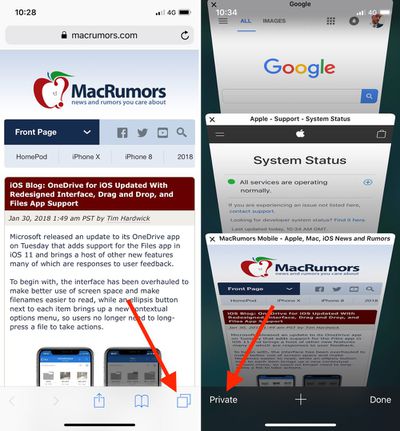
- Open Safari on your iPhone or iPad, tap the Pages icon (consisting of two squares) to bring up the open tabs view, and then tap "Private". Notice how the interface turns a dark gray.
- Tap the "+" icon to open a private tab.
- When you're done browsing, return to the open tabs view, individually swipe any open tabs to close them, and then tap "Private" again. Your private browsing session is now cleared from memory.
Clearing Existing Browsing History
When you clear your browsing history on a device running iOS 11 or higher, the same logs are cleared on any other devices signed into your iCloud account. The following methods also clear all cookies and web data on the device you're currently using, although AutoFill information remains unchanged.
Method 1
The first method outlined below allows you to either limit the clearing of history, cookies and website data to a specific timeframe, or to delete your existing web history altogether.
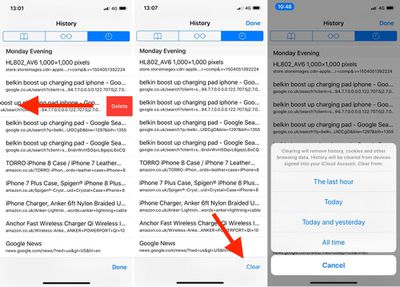
- Open Safari and with a tab open, tap the Bookmarks icon (the open book) located at the bottom of the screen.
- Tap the tab at the top of the screen with a clock symbol, and you'll see a history of your browsing activity.
- To remove instances of recorded visits to specific web pages, swipe leftwards across individual logs in the list and tap the red delete button that appears.
- To delete the entire browsing history list, tap "Clear" and select the option you prefer from the following: The last hour; Today; Today and yesterday; and All time.
Method 2
The second method of wiping your browsing history might be considered the 'nuke' option, since it clears all history, cookies and website data on that device, regardless of when the sites were accessed.
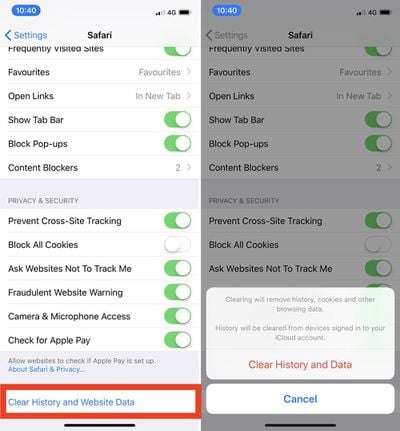
- Open the Settings app and scroll down to Safari in the list.
- Tap the "Clear History and Website Data" option near the bottom of the menu. (Note that this setting might be grayed out if there's already no history to clear or if parental controls are set for websites.)
- Tap "Clear History and Data" in the popup overlay.
And that's it. Note that these built-in Safari features only make you safer from discovery by other people in the same household.
If your privacy concerns extend to a desire for enhanced security and anonymity online, consider subscribing to a Virtual Private Network (VPN) service that offers an iOS client or supports OpenVPN (Private Internet Access and ProtonVPN are two popular options), and using a Tor-powered browser for iOS.
Related Stories
Best Black Friday iPhone Deals Still Available
Cellular carriers have always offered big savings on the newest iPhone models during the holidays, and Black Friday 2021 sales have now carried over into Cyber Monday as well. Right now we're tracking notable offers on the iPhone 13 and iPhone 13 Pro devices from AT&T, Verizon, and T-Mobile. For even more savings, keep an eye on older models like iPhone SE. Note: MacRumors is an affiliate...
Best Black Friday AirPods Deals Still Available
Black Friday 2021 deals are still going strong into Cyber Monday, and in this article we're tracking the best deals across Apple's AirPods lineup. Throughout the week we've been sharing the best sales for Apple devices like iPhone, Mac, and iPad, so be sure to follow us on Twitter for all of the latest Black Friday sales Note: MacRumors is an affiliate partner with some of these vendors. When...
Kuo: Apple AR Headset Coming in Late 2022 With Mac-Level Computing Power
Thursday November 25, 2021 8:32 pm PST by Eric Slivka
Apple's long-rumored augmented reality (AR) headset project is set to bear its first fruit late next year with the launch of the first device carrying a pair of processors to support its high-end capabilities, according to a new research report from noted analyst Ming-Chi Kuo seen by MacRumors. According to Kuo, the higher-end main processor is said to be similar to the M1 chip Apple...
Best Black Friday Apple Watch Deals Still Available
The Apple Watch always makes a great gift around the holiday season, and for Black Friday 2021 we're tracking a few solid offers on numerous models of the Apple Watch. In this article, you'll find the best Black Friday sales on the new Apple Watch 7, but the best money-saving discounts will be found on older models like the Apple Watch Series 3 and SE. Note: MacRumors is an affiliate partner...
Best Black Friday iPad Deals Still Available
Although Black Friday sales began as early as October in 2021, the shopping holiday is now officially underway and we're highlighting the best sales for each of Apple's product lines. In this article, you'll find the best Black Friday sales on iPad Pro and iPad mini. Note: MacRumors is an affiliate partner with some of these vendors. When you click a link and make a purchase, we may receive a...
Best Black Friday iMac and MacBook Deals Still Available
Our Black Friday 2021 coverage continues with the best deals you can find on MacBook Pro, MacBook Air, iMac, and Mac mini today. As with all Black Friday deals, we aren't sure how long any of these will last, and prices are always fluctuating, so if you see something you want, be sure to buy it soon. Note: MacRumors is an affiliate partner with some of these vendors. When you click a link and...
Huge List of Black Friday Deals on iPhone and Mac Cases, Cables, Accessories and Software
Black Friday is in full swing today, and in this article we're highlighting some of the best deals that you can find online among popular third-party accessory makers like Twelve South, Nomad, Satechi, and many more. Visit our Black Friday Roundup for a deeper dive into the best sales going on today. Note: MacRumors is an affiliate partner with some of these vendors. When you click a link and...
Apple's Black Friday Promotion Now Underway in the U.S. and More Countries
Friday November 26, 2021 12:07 am PST by Joe Rossignol
Apple's annual four-day Black Friday through Cyber Monday shopping event is now underway in the United States and select other countries, with customers able to receive a free Apple gift card with the purchase of select products through November 29. Participating countries include the United States, Canada, Australia, New Zealand, the UK, Ireland, France, Spain, Portugal, Italy, Germany,...
How To Clear Private Browsing History In Safari
Source: https://www.macrumors.com/how-to/safari-ios-11-private-browsing-delete-history/
Posted by: tolartherect.blogspot.com
0 Response to "How To Clear Private Browsing History In Safari"
Post a Comment